Problem
Keyword research required repeated collection, cleanup, deduplication, confidence review, and content planning before a useful decision could be made.
Portfolio Case Study
A working product dashboard that turns a niche or seed keyword into research data, confidence scoring, publishing notes, and content direction.
This project evolved from a workflow experiment into a usable SEO research tool. The dashboard connects to n8n webhooks, runs keyword research and confidence checks, then presents the results in a way a business owner or content team can actually use: opportunities, audience fit, content goals, publishing notes, and export-ready data.
Working dashboard demo Time reclaimed: estimated Financial ROI not independently measured
Evidence Snapshot
Product Demo
The demo shows the dashboard controlling the n8n workflow, running the research process, and turning the output into practical planning data instead of another spreadsheet to clean up. Run time varies with the query, data source, and mode selected.
Business Snapshot
Keyword research required repeated collection, cleanup, deduplication, confidence review, and content planning before a useful decision could be made.
Built a dashboard-controlled SEO research system that can run keyword discovery or confidence checks from the same front end.
n8n, OpenAI, DataForSEO, Docker, and a custom browser dashboard for collection, scoring, publishing notes, and export.
The architecture can be packaged, installed, and adapted for businesses that need repeatable SEO research without a custom rebuild every time.
ROI Snapshot
Conservative estimate: 3 to 6 hours saved per active content-planning week by replacing manual keyword collection, cleanup, deduplication, spreadsheet setup, and first-pass strategy review with a reusable dashboard.
Estimated 3 to 6 hours per week saved during SEO research cycles, especially when building topic lists, content briefs, or keyword batches.
Produces cleaner keyword data, confidence signals, audience assumptions, and publishing notes earlier in the process, so content decisions start from a stronger base.
Creates an installable workflow foundation that can support clustering, prioritization, briefs, reporting, and future SEO planning layers.
1. The Problem
Manual keyword research tends to break down in predictable ways. Data comes from too many places, formatting drifts, and by the time you clean it up, you have already burned time you were trying to save.
The first version solved the workflow problem. The next problem was usability. A business owner should not need to understand n8n, credentials, webhook payloads, confidence logic, or spreadsheet cleanup just to get a practical SEO research run.
2. Project Goals
Use smaller n8n modules with clear jobs instead of one oversized workflow that becomes difficult to maintain.
Build the flow once in a way that can support future research systems, content workflows, and client installs.
Handle both direct seed keywords and wider niche exploration without rebuilding the system each time.
Produce structured data that the interface can summarize immediately, not a stack of half-clean exports.
Leave room for clustering, prioritization, content planning, and brief generation later on.
Separate lower-cost keyword research from deeper confidence runs so the user can choose the right level of analysis for the job.
3. System Architecture
The system uses an orchestrator pattern. One main workflow coordinates the run, and each major step is handed off to a dedicated module. The dashboard sends the run mode, niche, seed terms, audience, content goal, limits, and confidence options into the webhook, then renders the response back into a decision-friendly interface.
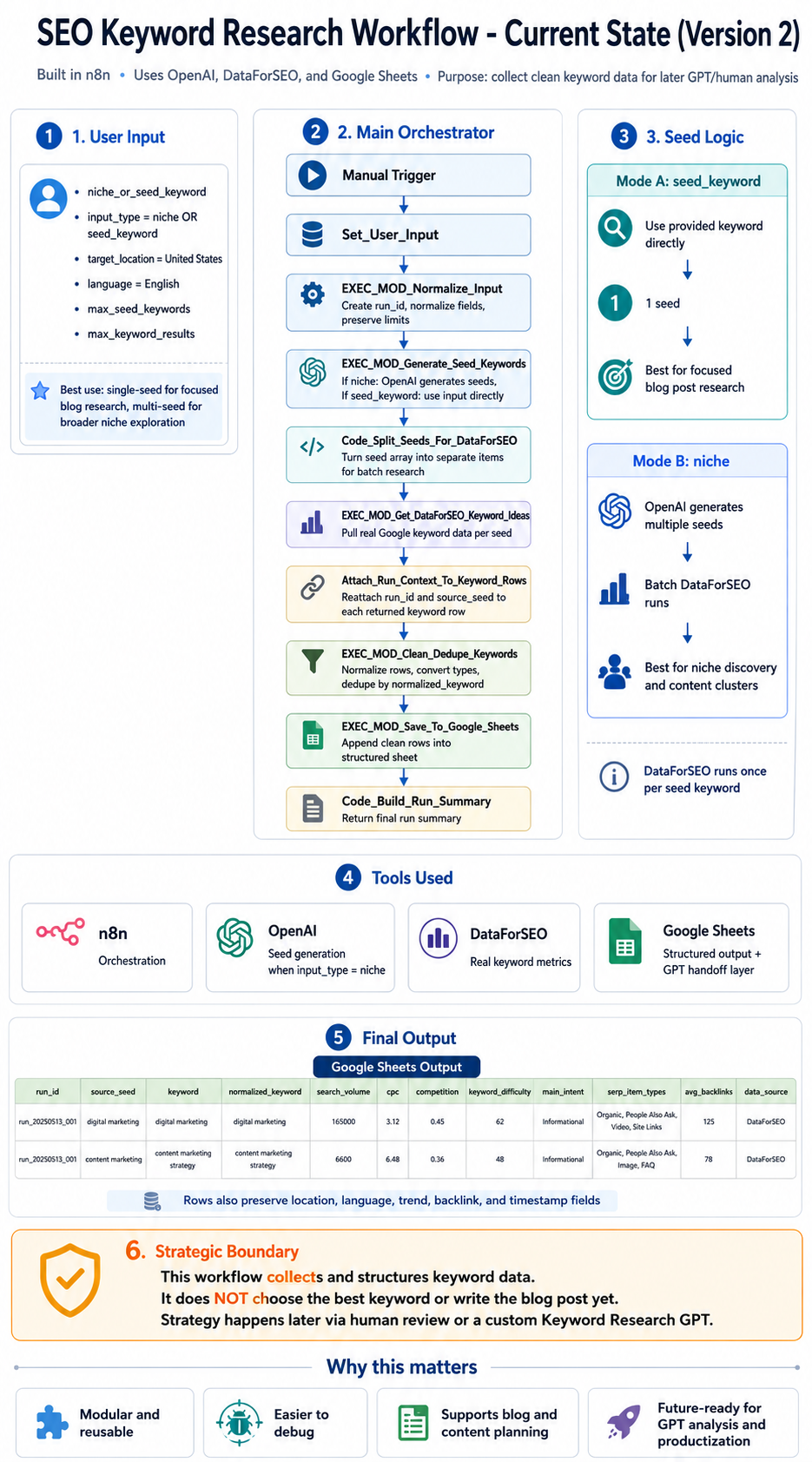
The real value here is separation of responsibilities. Input handling, seed generation, data retrieval, cleaning, confidence scoring, publishing notes, and run summaries all live in their own layers. That makes the system easier to reuse and much easier to reason about when something changes.
4. Workflow Breakdown
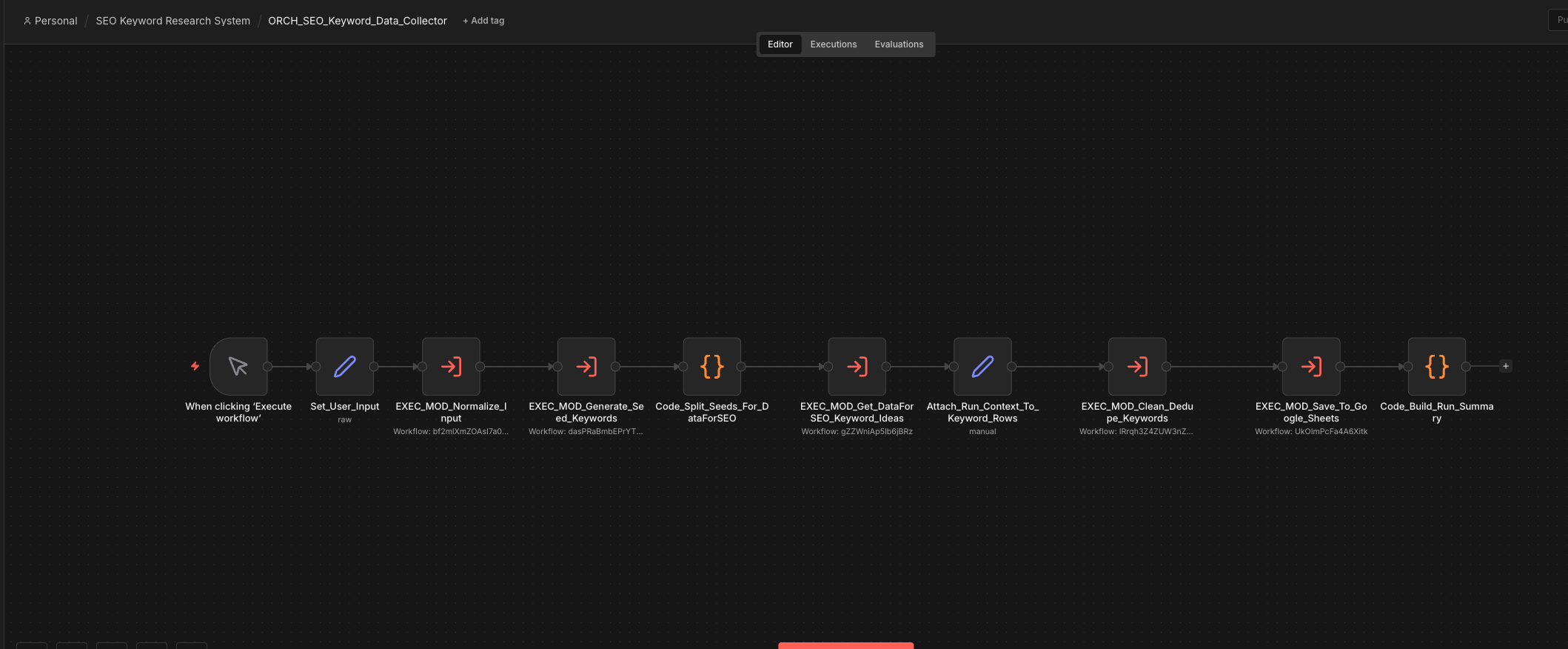
Every run starts by cleaning and standardizing the input. That includes limits, location, language, and input type, so the rest of the system is working with predictable values.
The dashboard supports a lower-cost keyword research run and a deeper confidence run, so the user can choose breadth or validation without changing workflows.
The workflow sends each seed through DataForSEO to pull real keyword metrics. This is where the process stops being conceptual and starts becoming a real dataset.
Returned rows are normalized, typed correctly, and deduplicated by normalized keyword values. Clean data is the difference between a workflow that scales and one that quietly creates more cleanup work for you later.
Once the dataset is clean, the workflow returns summary cards, keyword opportunities, best angles, audience fit, and publishing notes directly to the interface.
Each execution ends with a usable run summary and exportable keyword data, so the result can move into planning, reporting, or a content brief without extra cleanup.
5. Data Output Structure
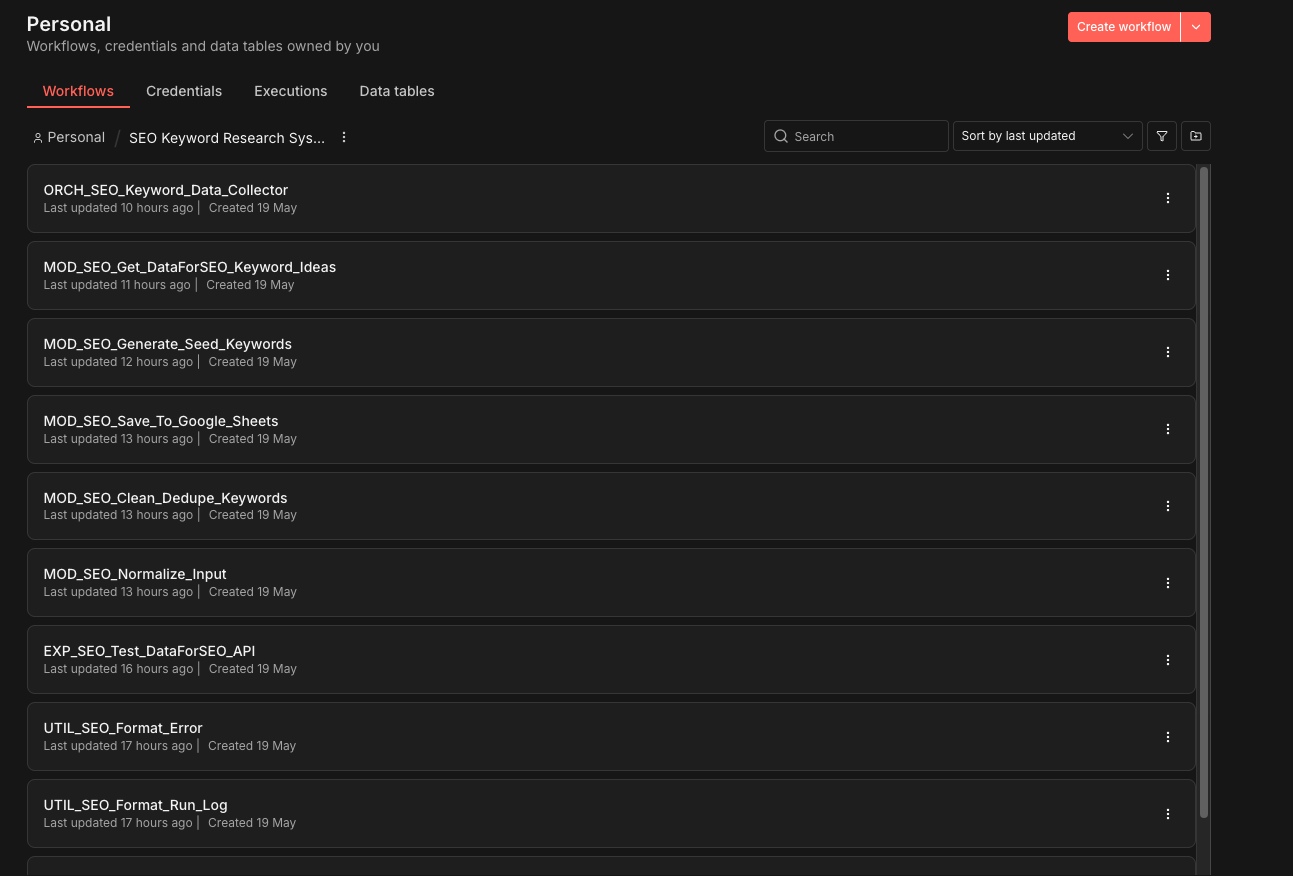
The final response is structured so it can support human review, content planning, prioritization, exports, and deeper confidence checks. It is not just a raw dump. It is meant to be a usable working dataset inside the dashboard.
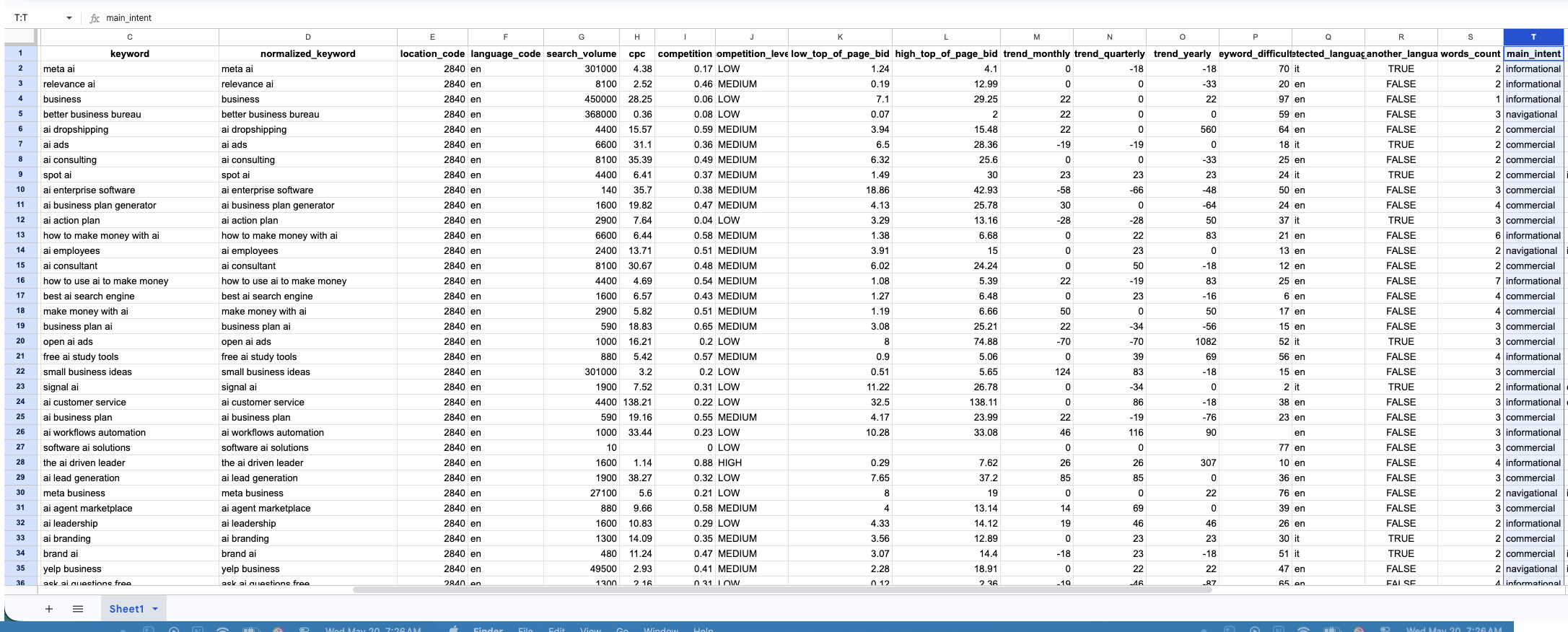
Search volume, CPC, competition, difficulty, and related keyword signals.
Main intent and audience context make later filtering and content planning a lot easier.
Keyword difficulty makes prioritization easier when the dataset grows.
Summary notes turn the run into angles, content goals, and practical next steps instead of raw numbers alone.
6. Dashboard Product Layer
The biggest shift in this version is that the workflow is no longer only an n8n build. It now has a dashboard layer that controls the webhook inputs, stores project settings, lets the user choose the run type, and presents the returned data in a format that feels like a tool instead of a backend demo.
Best for broad discovery and low-cost research runs. It pulls structured keyword data and highlights opportunities worth reviewing.
Best for validating stronger opportunities. It uses extra fields and scoring logic to improve confidence before committing to content.
The user can provide audience and content goal context, or the workflow can infer it from the niche and seed terms at runtime.
The system is being shaped around Docker, environment variables, clean workflow exports, and replaceable credentials so it can be installed for other businesses without shipping private keys.
7. Strategic Design Decisions
Modularity is not just a technical preference here. It is what makes the workflow easier to scale, easier to reuse, and much easier to debug when something breaks or changes.
Separating the dashboard, workflow, credentials, and data output was another deliberate choice. The dashboard should control a run without owning private API keys. The workflow should process data without trapping the business logic in the interface. That boundary is what makes the product more installable.
New modules can be added without turning the core workflow into a maintenance problem.
When a module fails, the problem area is much easier to isolate.
The same structure can support future SEO and research workflows, or be adapted into a client installation, without starting over.
8. Challenges and Lessons Learned
One of the bigger tensions in this project was balancing automation with usability. It is easy to keep stacking logic into n8n because technically you can. That does not automatically make the tool easier to sell, install, or explain.
The clearest lesson was that clean structure matters more than clever automation. If the data is inconsistent, the downstream work gets shakier. If the interface does not explain the output clearly, the workflow still feels like a technical demo.
The better path was to build a solid collection system first, then add a dashboard that makes run modes, audience assumptions, content goals, confidence, and publishing notes visible enough for a real user to trust.
9. Results and Impact
The collection process is much quicker and more repeatable than manual assembly, with less back-and-forth between tools.
The output is structured well enough to support filtering, planning, confidence review, and publishing decisions.
Each run produces a dataset and summary that can be used again instead of a one-off export.
The architecture is close enough to package that it can become a practical consulting installation for businesses that need a repeatable SEO research process.
This is a practical example of turning workflow automation into a product-style tool with a clearer user experience.
10. Evidence and Limits
The dashboard, demo, and n8n workflow show that the system can collect, score, and present keyword research. The 3–6 hour weekly figure is a conservative active-planning estimate, not measured revenue, rankings, traffic, or a promise that the tool makes publishing decisions on its own.
11. Future Expansion
The current version is doing the right job for this stage. It collects, scores, and presents data well enough to show a real tool. The next step is packaging the install path, cleaning the credential setup, and tightening the client onboarding flow.
Start with a focused async review, a written fix path, and a practical workflow map before you invest in a larger research dashboard or automation build.
Request a $49 Workflow Review