Problem
Useful tasks, reminders, ideas, and meeting leftovers often live inside rough notes that never become a plan.
Portfolio Case Study
A focused automation that turns rough working notes into a clean daily action brief, then saves the result as a real Google Doc.
This project started with a practical problem: scattered notes are easy to capture and hard to act on. The Daily Action Brief Builder uses n8n, AI cleanup, and Google Docs to turn messy input into a structured brief with a summary, action items, parked ideas, and review notes.
Working workflow package Time reclaimed: estimated Financial ROI not independently measured
Evidence Snapshot
Business Snapshot
Useful tasks, reminders, ideas, and meeting leftovers often live inside rough notes that never become a plan.
Built a workflow that turns messy notes into a structured daily brief and saves the result where it can be reviewed and used.
n8n handles the flow, an AI step organizes the content, and Google Docs becomes the final human-readable output.
The same pattern can send structured output to Notion, Obsidian, task boards, email drafts, or a command center.
ROI Snapshot
Conservative estimate: 30 to 90 minutes saved per week for anyone who regularly turns notes, meeting fragments, or working thoughts into action lists. The larger gain is consistency: the same structure appears every time, without rebuilding the brief by hand.
Reduces repeated note cleanup, task extraction, and planning-document formatting.
Moves scattered information into a clearer review format before it disappears into another notes pile.
Creates a workflow foundation that can be adapted for teams, creators, consultants, and personal operating systems.
1. Project Overview
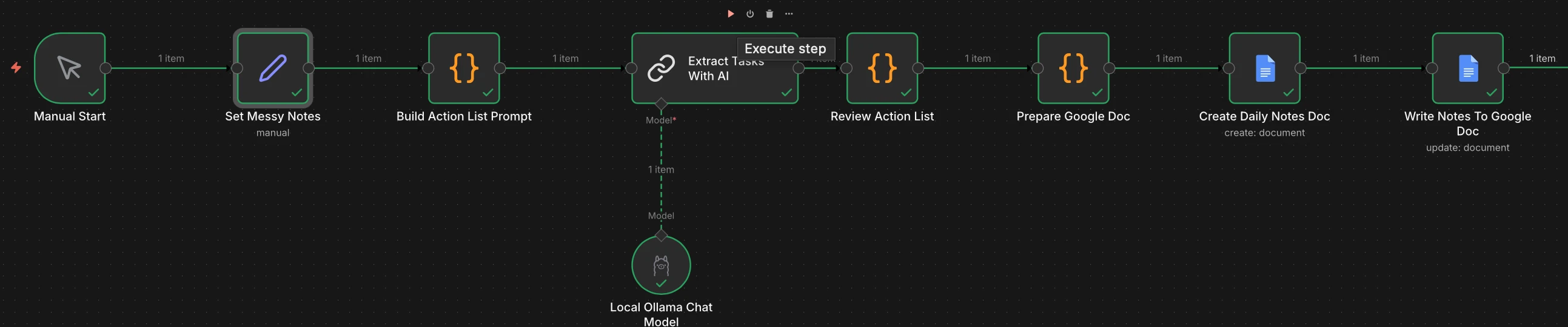
The Daily Action Brief Builder is intentionally simple. It does not try to become a full assistant, project manager, or productivity operating system. It does one useful job: take rough notes and turn them into a brief someone can actually review.
That makes it a strong automation example because the value is visible at the end. The workflow does not stop at a successful execution screen. It creates a dated Google Doc with a summary, action items, parked ideas, and a review note.
2. The Problem
Most people do not need another place to write things down. They need a better way to turn those things into something they can act on.
That is the gap this workflow addresses. A rough note may contain tasks, questions, follow-ups, context, and half-formed ideas. Without a cleanup step, that information either gets ignored or manually rewritten later.
The workflow creates a repeatable review step between capture and action. That is where automation earns its place.
3. Workflow Architecture
The workflow starts with rough working notes instead of pretending every source arrives clean and perfectly structured.
The AI step turns the notes into a predictable brief structure: summary, actions, parked ideas, and review notes.
The result is saved to Google Docs so the output can be opened, edited, shared, or copied into another planning system.
The workflow was exported, scrubbed, documented, and published as a GitHub repo so it can be reviewed and reused.
4. Input Design
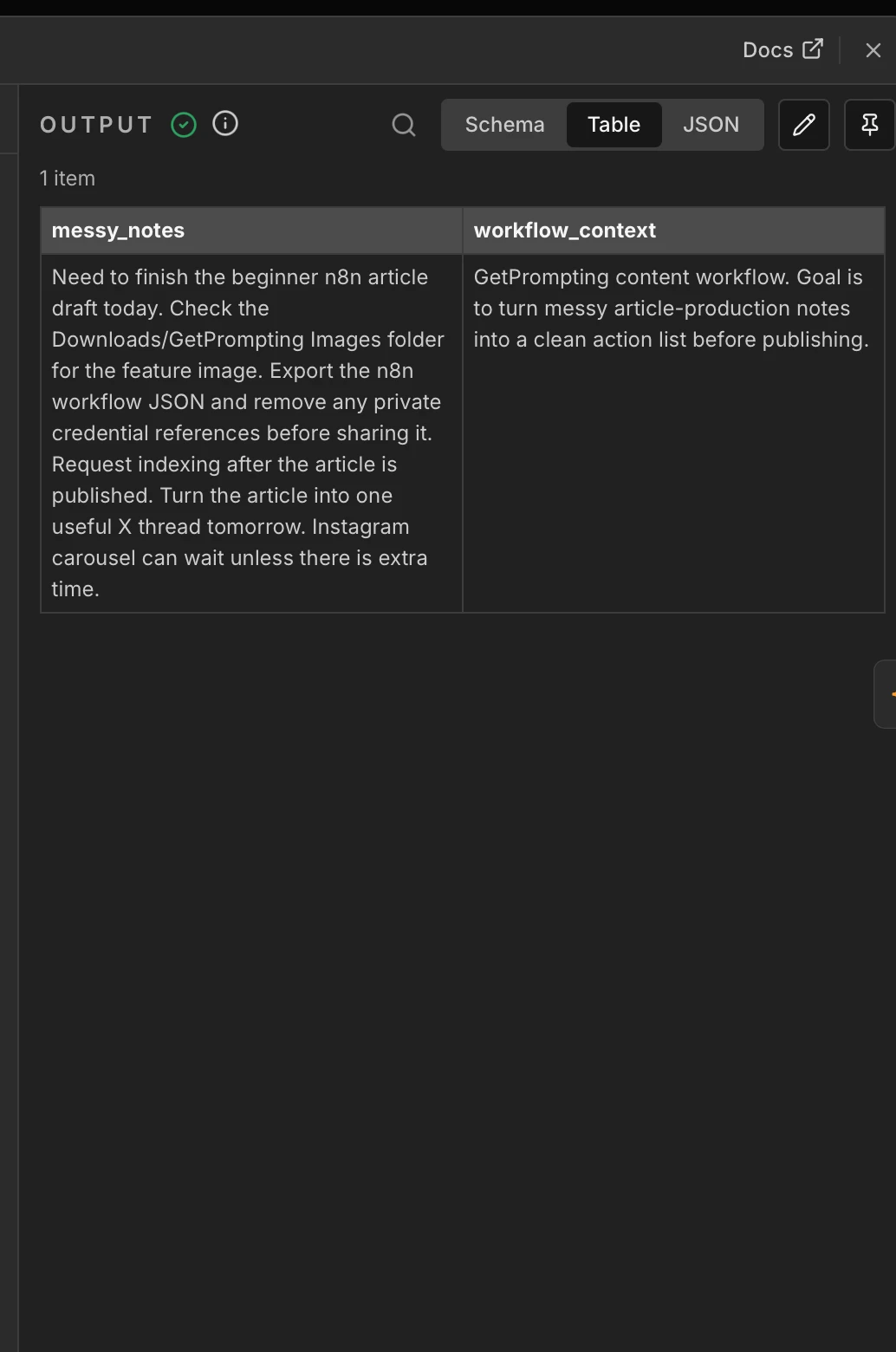
The input example is intentionally ordinary. It includes tasks, reminders, content ideas, and loose context in one place. That kind of mess is where small AI workflows are most useful.
5. Output Design
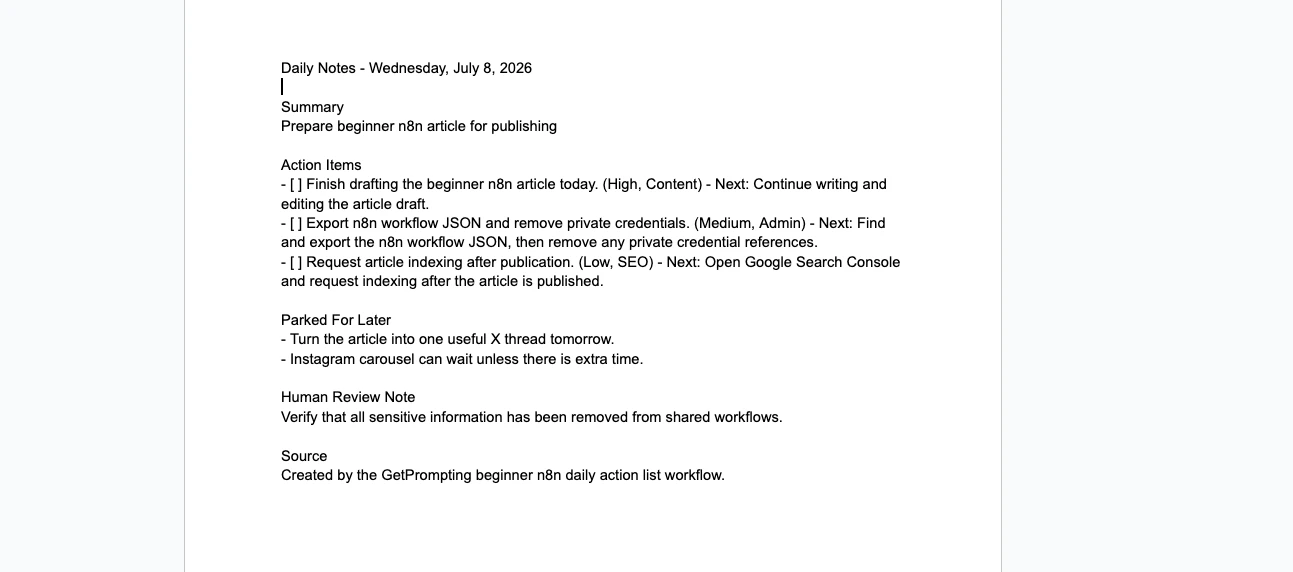
A workflow becomes easier to trust when the output is concrete. In this case, the final result is not hidden inside n8n. It becomes a clean Google Doc that can be reviewed like normal work.
That design choice matters for consulting and training. People understand the value faster when the system produces something they already know how to use.
6. Packaging
The build did not stop after the workflow ran once. The exported JSON was scrubbed, tested, and packaged with installation notes, customization guidance, troubleshooting docs, screenshots, sample input, and sample output.
That turns the project from a private experiment into a portable workflow asset. It can support the GetPrompting tutorial, future consulting examples, and a growing library of reusable automation patterns.
The repo includes the n8n workflow JSON and setup notes for recreating the workflow.
The same pattern can be adapted to Notion, Obsidian, email drafts, or task systems.
The documentation explains the workflow in business terms, not just node-by-node mechanics.
7. Key Design Decisions
The workflow solves messy note cleanup before expanding into a larger assistant or dashboard system.
Google Docs makes the final output easy to inspect, edit, and understand.
The JSON export avoids stored credentials and can be imported without handing over private configuration.
The same input, AI cleanup, reviewable output, useful destination pattern can support many other workflows.
8. Evidence and Limits
The workflow produces a dated Google Doc with a summary, action items, parked ideas, and review notes. The 30–90 minute weekly figure is a conservative estimate for recurring note-cleanup work, not independently measured financial ROI. The output still needs a person to review, prioritize, and act on it.
9. Project Links
The GetPrompting article explains how the workflow works for readers who want to build it themselves. The GitHub repo gives them the package. This case study explains the business value and design thinking behind the project.
Start with a focused async review, a written fix path, and a practical workflow map before you invest in a larger build.
Request a $49 Workflow Review Read the GetPrompting Tutorial View the GitHub Repo